A WiFi home power monitor helps homeowners see how much electrical power their home is using at any given moment. Instead of relying only on a monthly electricity bill, users can check live power readings, identify periods of high demand, and understand how household equipment affects electricity usage.
Some monitors also provide historical energy records, individual circuit measurements, and solar import/export monitoring.
But not every WiFi power monitor offers the same information. The right choice depends on whether you want to measure your entire home, specific electrical circuits, or power flowing between your home and the grid.
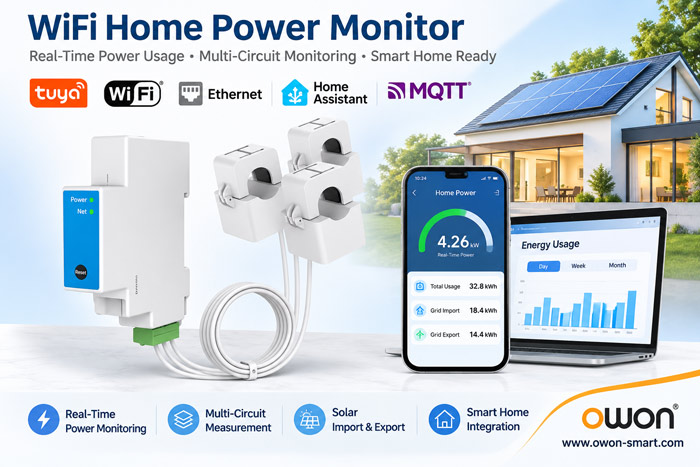
What Is a WiFi Home Power Monitor?
A WiFi home power monitor is an electrical measurement device that sends supported power readings to a mobile app or monitoring platform over a wireless network.
Many systems use current transformers (CT clamps) installed around electrical conductors in a distribution panel.
A typical system consists of:
- Power monitoring unit: Measures electrical parameters and calculates power usage.
- CT clamps: Measure current in selected conductors.
- WiFi connection: Transfers supported measurements to an app or monitoring platform.
Depending on the model, the monitor may display voltage, current, active power, power factor, and accumulated energy consumption.
Unlike a utility billing meter, a home power monitor is generally intended to provide additional visibility into electricity usage.
Real-Time Power vs. Energy Consumption: What’s the Difference?
One of the most useful features of a home power monitor is the ability to distinguish current power demand from accumulated energy consumption.
Power (W or kW) describes how quickly electricity is being used at a particular moment.
Energy (kWh) describes how much electricity has been consumed over time.
For example, a 2,000W electric heater operating continuously for one hour consumes approximately 2kWh of electricity.
| Measurement | What It Tells You | Typical Use |
|---|---|---|
| Watts (W) | Current power demand | See how much power is being used now |
| Kilowatts (kW) | Power demand on a larger scale | Monitor whole-home electrical loads |
| Kilowatt-hours (kWh) | Accumulated energy consumption | Compare daily or monthly usage |
| Voltage (V) | Electrical supply voltage | Check supply conditions |
| Current (A) | Electrical current | Understand circuit loading |
Real-time power readings are especially useful when checking how electrical demand changes as equipment switches on or off.
Historical kWh records help explain how those changes contribute to total electricity consumption.
How Does a WiFi Home Power Monitor Work with CT Clamps?
A CT-based monitor measures current without requiring the full load current to pass through the monitoring unit.
The CT clamp is installed around the appropriate conductor, while the meter uses the corresponding voltage measurement to calculate electrical power.
The monitoring process can be summarized as:
Electrical Supply → CT Clamps → Power Monitor → WiFi → Mobile App
For example, a homeowner might observe an increase in power demand when an electric water heater starts operating.
A whole-home monitor can show the change in total demand, but it may not identify the exact appliance responsible.
For more detailed analysis, additional CT channels can be used to monitor selected circuits.
CT installation must follow the manufacturer’s wiring instructions. Work inside electrical panels should be performed by qualified electrical personnel.
Whole-Home Power Monitoring vs. Circuit Monitoring
A WiFi power monitor may measure the entire home’s electrical supply or individual circuits.
Whole-home monitoring provides an overall view of electricity demand. It is useful for checking peak usage and changes throughout the day.
Circuit monitoring provides additional detail by measuring selected electrical circuits separately.
For example, homeowners may want to monitor:
- Air conditioning and heating circuits
- Electric water heaters
- Kitchen appliance circuits
- EV charging circuits
- Solar-related electrical connections
A multi-circuit system can help identify which circuits contribute most to household electricity demand.
However, monitoring a circuit is not always the same as measuring an individual appliance, particularly when several devices share the same circuit.
Can a WiFi Home Power Monitor Track Solar Electricity?
Some WiFi power monitors support bidirectional measurement, allowing them to distinguish electricity flowing into and out of a monitored connection.
For a solar-powered home, this can provide useful information about grid import and export.
When household demand exceeds available solar production, electricity may be imported from the grid.
When solar production exceeds household demand, surplus electricity may be exported, depending on the system configuration.
A monitor installed at the grid connection measures power flow at that point. It does not automatically measure total solar generation separately.
Additional measurement points may be required for a complete view of solar production and household consumption.
WiFi Home Power Monitor and Smart Home Integration
A WiFi power monitor can be useful beyond its mobile app when supported measurements are available to a smart home platform.
For example, Home Assistant can display compatible power and energy readings alongside information from other connected devices.
Before selecting a monitor, check:
- Whether real-time power readings are available
- Whether accumulated kWh data is supported
- Whether import and export measurements are exposed
- Whether the integration works with the required platform
- Whether data remains available during network interruptions
WiFi connectivity alone does not guarantee Home Assistant compatibility.
Similarly, Tuya, MQTT, and Modbus are different integration options. Their availability depends on the specific meter version.
Choosing a WiFi Home Power Monitor: 5 Essential Features
1. Real-Time Power Measurements
Look for a monitor that provides active power readings in watts or kilowatts.
Check the reporting interval if frequent updates are important for your application.
2. Electrical System Compatibility
Confirm whether the meter supports single-phase, split-phase, or three-phase electricity.
This is particularly important for North American split-phase homes and properties with three-phase supplies.
3. Suitable CT Sensors
Choose CT clamps with current ratings and physical dimensions appropriate for the electrical installation.
More CT channels may be useful when several circuits need to be monitored.
4. Solar Monitoring Capability
If the home has solar panels, confirm whether the monitor supports bidirectional power and energy measurements.
Also consider whether separate solar generation monitoring is required.
5. App and Platform Compatibility
Check whether the device supports the required monitoring app and smart home integration.
For advanced projects, verify the communication protocol and available measurement data before purchasing.
OWON WiFi Power Monitors for Different Home Applications
OWON offers several CT-based WiFi power monitoring devices designed for different electrical systems and installation requirements.
| Model | Main Features | Suitable Application |
|---|---|---|
| PC311 | Single-phase CT-based monitoring, WiFi connectivity | Single-phase residential monitoring |
| PC321 | Single-phase, split-phase and three-phase CT monitoring | Homes and buildings requiring multi-phase measurement |
| PC4713 | WiFi + Ethernet, CT monitoring, bidirectional measurement | Solar homes and energy monitoring integration |
For basic single-phase monitoring, the PC311 provides a straightforward CT-based option.
The PC321 is suitable for installations requiring additional phase monitoring, while the PC4713 offers WiFi and Ethernet connectivity and supports Home Assistant integration on the applicable version.
The supported electrical systems, CT ratings, and software integrations should always be checked against the exact product variant.
Frequently Asked Questions
Can a WiFi home power monitor show electricity usage in real time?
Yes. Compatible monitors provide live power readings in watts or kilowatts. The reporting interval depends on the device and monitoring platform.
Can a WiFi power monitor help reduce electricity bills?
It can help identify periods of high electricity demand and changes in consumption. Actual savings depend on how the information is used.
Does a WiFi home power monitor require CT clamps?
Not always. Some monitors use direct electrical connections, while others use external CT clamps. The installation method depends on the model.
Can a WiFi home power monitor track individual appliances?
A whole-home monitor generally measures total electricity demand. Circuit-level monitoring can provide more detail, but individual appliance identification may require dedicated measurement points.
Can a WiFi home power monitor work with Home Assistant?
Selected models support Home Assistant integration. Check the exact model and available data entities before purchasing.
Can I install a WiFi home power monitor myself?
Electrical panel installation can expose installers to hazardous voltages. A qualified electrician should perform the work according to the manufacturer’s instructions and applicable regulations.
Conclusion
A WiFi home power monitor provides a clearer view of household electricity demand through real-time power readings, CT-based measurement, and optional historical energy monitoring.
For homeowners, the most useful features depend on whether they need whole-home monitoring, circuit-level measurements, solar import/export tracking, or smart home integration.
OWON Technology develops WiFi energy monitoring devices for residential, commercial, and OEM/ODM applications, with different CT configurations and communication options.
Explore OWON WiFi smart power meters to compare available models and find a suitable configuration.