A Tuya energy meter combines electricity monitoring with connected features such as app access, historical energy data, and smart automation. Depending on the model, it can monitor a single electrical load, a whole home, a three-phase system, or even solar energy production.
However, not every Tuya meter has the same electrical architecture or functions. CT range, phase configuration, data export, relay control, installation method, and platform compatibility can vary significantly.
This guide explains what to check when choosing and using a Tuya energy meter.
What Is a Tuya Energy Meter?
A Tuya energy meter measures electrical parameters and connects to the Tuya ecosystem for remote monitoring.
Depending on the device, monitored data may include:
- Voltage
- Current
- Active power
- Power factor
- Frequency
- Energy consumption
Some models also provide bidirectional measurement for solar applications or additional parameters for more advanced energy monitoring.
The main advantage is connectivity: instead of reading energy information only at the electrical panel, users can access supported data remotely through an app or connected platform.
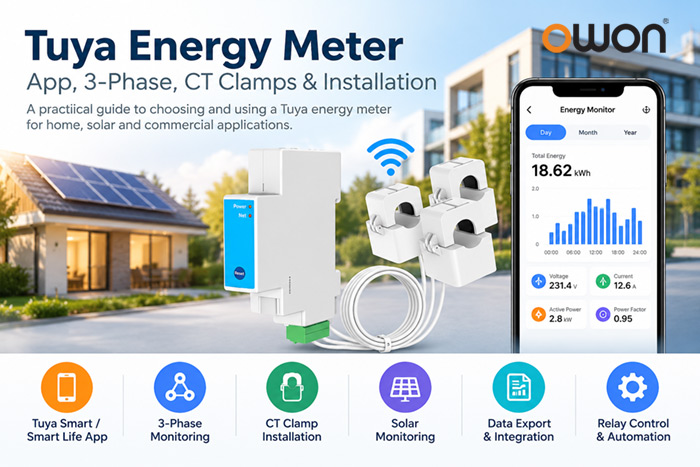
How Does the Tuya Energy Meter App Work?
Compatible meters can connect with Tuya Smart or Smart Life, allowing users to view supported electricity data from a smartphone.
Depending on the meter, the app may provide:
- Real-time electricity data
- Daily or monthly energy history
- Energy consumption trends
- Automation settings
- Relay control
- Alerts or thresholds
- Historical data export
The exact functions depend on the hardware and firmware. A Tuya-compatible meter should therefore not be assumed to support every feature available in the Tuya ecosystem.
For professional projects, buyers should confirm what data can be viewed, stored, and exported before selecting a meter.
How to Choose a Tuya Energy Meter for 3-Phase Systems
A Tuya energy meter for 3-phase systems normally uses multiple measurement channels or CT clamps to monitor the relevant phase conductors.
Before selecting one, check:
Electrical system: Confirm whether the installation is single-phase, split-phase, 3-phase 3-wire, or 3-phase 4-wire.
CT quantity: A three-phase installation may require multiple CT sensors.
CT current range: Choose the CT according to the expected load.
Bidirectional monitoring: Important when solar generation or grid import/export needs to be measured.
Communication: Determine whether WiFi/app access alone is enough or whether the project requires additional integration.
This is particularly important for commercial buildings, solar installations, workshops, and energy management projects.
What Is a Tuya Energy Meter with CT Clamp?
A Tuya energy meter clamp uses an external current transformer (CT) installed around an electrical conductor to measure current.
This architecture is useful for retrofit energy monitoring because the main load current does not need to pass directly through the meter itself.
CT-based meters can be used for:
- Whole-home monitoring
- Commercial electrical panels
- Solar PV systems
- HVAC equipment
- Individual electrical loads
- Three-phase energy monitoring
CT ratings should match the application. For example, an 80A Tuya Smart Life WiFi energy meter may be appropriate for certain lower-current installations, while larger electrical loads may require 120A, 200A, 300A or higher CT ranges.
The correct CT should be selected according to the electrical load and meter specification—not simply by choosing the highest available rating.
Can a Tuya Energy Meter Export Data?
Some Tuya energy meters support historical energy data and data export, but this is model-dependent.
This distinction matters for commercial and B2B projects.
A homeowner may only need to check daily electricity consumption in an app. An energy management project may need historical records for analysis, reporting, or integration with another platform.
Before purchasing, confirm:
- What historical data is stored
- Available time intervals
- Whether data can be exported
- Available export format
- Whether an API or other integration method is required
For larger EMS or BMS projects, these capabilities can be more important than the mobile app itself.
Can a Tuya Energy Meter Work with Home Assistant?
Some Tuya energy meters can be integrated with Home Assistant, but compatibility should always be checked for the specific model and integration method.
For example, selected OWON Tuya energy meters support Home Assistant integration. The PC4713 Tuya version supports the Tuya ecosystem and HA platform integration while providing WiFi and Ethernet connectivity, historical energy data, and bidirectional energy monitoring.
For users specifically searching for a Tuya WiFi energy meter for Home Assistant, verifying the available entities and energy data before deployment is important.
What About Switch and Relay Control?
Some energy meters only monitor electricity, while others combine measurement with a relay or dry-contact output.
A Tuya energy meter switch can therefore refer to a meter that provides both energy monitoring and load-control capabilities.
This can support applications such as energy-based automation or remote load management.
However, relay capacity and control logic vary by product. Always check the rated load, relay type, and intended application rather than assuming that every Tuya energy meter can directly switch a high-current load.
Tuya Smart Meter Installation: What Should You Check?
Installation depends on the meter architecture.
DIN rail meters are typically installed inside an electrical distribution panel, while external CT clamps are installed around the appropriate conductors.
Before installation, confirm:
- Electrical system and wiring configuration
- Meter voltage requirements
- CT direction and position
- CT current range
- WiFi network requirements
- App pairing procedure
Incorrect CT orientation or wiring can affect measurement results.
Electrical panel installation should be carried out by a qualified electrician in accordance with local electrical regulations and the manufacturer’s instructions.
Reset, Calibration and Manual Questions
Searches for Tuya energy meter reset, calibration, and manual usually relate to a specific product rather than the Tuya platform itself.
Reset procedures can differ between manufacturers and models. The same applies to calibration and configuration.
Therefore:
- Follow the manual for the exact meter model.
- Do not use another Tuya meter’s reset procedure simply because the app looks similar.
- Do not change calibration parameters unless the manufacturer provides a supported procedure.
- Confirm CT specifications and installation before assuming that an unusual reading is a calibration problem.
This is especially important in professional energy monitoring projects where measurement consistency matters.
What About ESPHome and Tasmota?
Some users search for Tuya energy meter ESPHome or Tuya energy meter Tasmota because they want local control or alternative firmware.
Compatibility is highly hardware- and firmware-specific.
A Tuya-compatible product should not automatically be assumed to support ESPHome or Tasmota. For professional projects, it is safer to select a meter that officially provides the required integration method rather than relying on unsupported firmware modification.
If local or third-party integration is important, check for officially supported options such as MQTT, HTTP, Modbus, or Home Assistant before selecting the hardware.
Choosing the Right Tuya Energy Meter
There is no single Tuya energy meter that fits every application.
For a residential project, app access and a suitable CT range may be the priority. For a 3-phase Tuya energy meter, electrical compatibility and multiple CT inputs become more important. Solar projects may require bidirectional monitoring, while commercial EMS projects may prioritize data export and system integration.
OWON provides different Tuya-compatible architectures, including:
| Requirement | OWON Option |
|---|---|
| Single-phase CT monitoring | PC311 |
| Single / split / 3-phase monitoring | PC321 |
| Single-phase DIN rail monitoring | PC472 |
| DIN rail monitoring + relay | PC473 |
| Multi-circuit monitoring | PC341 |
| Advanced energy / solar monitoring | PC4713 |
| Relay + energy monitoring | CB432 |
For B2B projects, the meter should therefore be selected according to the electrical architecture, CT configuration, data requirements, and integration platform rather than app compatibility alone.
FAQ
What is a Tuya energy meter?
A Tuya energy meter measures electrical data and connects to the Tuya ecosystem for supported remote monitoring, historical data, and automation.
Can a Tuya energy meter monitor 3-phase electricity?
Yes, if the meter is designed for the required three-phase electrical system. Check its supported wiring configuration and number of CT inputs.
Can I export data from a Tuya energy meter?
Some models support historical data export, but this varies by meter and platform implementation. Check the product specification before purchase.
Does a Tuya energy meter work with Home Assistant?
Some models do. Compatibility depends on the specific meter and integration method, so it should be confirmed before deployment.
Does every Tuya energy meter have a switch?
No. Some meters provide monitoring only, while others include relay or dry-contact control.
Can I use ESPHome or Tasmota with a Tuya energy meter?
Do not assume compatibility. ESPHome and Tasmota support depends on the specific hardware and firmware. Officially supported integration methods are preferable for professional deployments.
Conclusion
A Tuya energy meter can provide much more than remote electricity readings, but capabilities vary significantly between products.
When choosing one, first identify the electrical system and CT requirements, then evaluate app functions, three-phase compatibility, bidirectional monitoring, historical data export, relay control, and platform integration.
For professional energy monitoring projects, selecting the correct electrical and integration architecture is more important than choosing a meter simply because it carries Tuya or Smart Life connectivity.